More with Variables in Chapbook
Digging deeper into variable scope and advanced features.
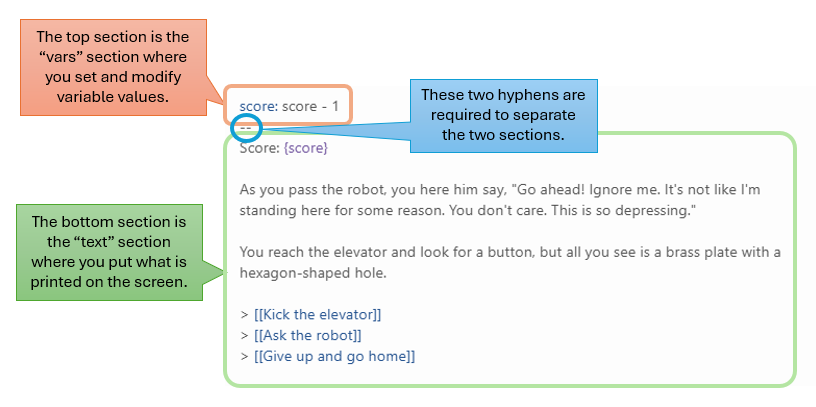
There has been some confusion about how to the structure of a Chapbook passage. If you want to set the value of variables, there must be a vars section followed by a text section. The two sections are separated by a line of two hyphens (see the picture below).
When the player enters a passage, all of the variable values in the vars section are set in order from top to bottom. The text section comes after the dashes and is what the player sees.
It's very easy in Chapbook to print the value of a variable. It's like using an f-string in Python. In the text section of a passage, put the name of the variable in curly braces:
Your score is {score}.
When the player sees this text, the actual value of the
score variable will be displayed instead of the curly braces.
You cannot put any if branches in the vars section,
but you can use variable assignment conditions. This allows you to set a
variable value based on another variable's condition. For example, if you
want to choose a form of transportation based on the distance to the
destination:
transportation: 'car'
transportation (distance > 500): 'plane'
--
You'll need to take a {transportation} to get there.
In this example, the player will take a car by default, but if the distance is over 500 miles, the transportation variable is changed to 'plane'. You can chain multiple assignment conditions on the same variable to create more complex logic.
You can let the player type in a value that gets stored in a variable. Put something like this in the text section:
{text input for: "variable_name"}
The variable name must be put in quotation marks for this to work. Here is an example for the opening of Island Adventure to get the player's name:
score: 0
apple_present: true
--
# Island Adventure

Welcome to Island Adventure. What is your name?

{text input for: "name"}

[[Let's Go!->South Beach]]
With this code, the opening screen displays a text input field where the
player can type their name, which gets stored in the name
variable for use later in the story.
If you need the review sheet for the exam, you can download it here. The exam is Monday, May 18.
You can access the Blooket for the exam review by going to https://dashboard.blooket.com/set/69fe4509d1fb6a1d76a1e520.
Keep working on your Chapbook story! Use variables, text input, conditional assignments, and conditional display to make your story interactive and engaging. Your story is due at the end of class on Monday, May 11.