Turtle Picture Project Planning
lastname_turtle_pic.py and due at the end of class
on Monday, April 20.
Use shapes and coordinates to create a recognizable drawing.
You will have to do a little planning to get a recognizable picture. You have to have an idea of what you want to draw, and then you have to determine what shapes you want to use and where they will be drawn.
The turtle starts in the middle of the window at location 0, 0. Before you start drawing, you probably need to move first. In this example, we will draw a house, and we want it centered in the drawing area. The main part of the house will be a square of size 150. To center this square, the upper left corner should be at -75, 75 (see picture below).
After the square is drawn, we can draw the roof as a triangle starting at -75, 75, which is where the turtle ends up after drawing the square. All we have to do is turn left 60 degrees to make the triangle point up, and then draw the triangle.
Next, lets add a door. Because the we turned the turtle 60 degrees left, we need to turn it 60 degrees right to be straight again for the door. We can make the door using two squares of size 25 at coordinates -13, -25 and -13, -50.
Finally, lets make windows at -45, 25 and 25, 25.
How did I come up with these numbers? They are all based on the square part of the house being 150 wide and 150 tall. I put the upper left corner at x = -75. If you add 150 to -75, you get 75. This means the square is centered side-to-side from -75 to 75. For the door, I knew that the bottom of the house is at y = -75. Since the door is made of squares size 25, I want the top of the squares to be at y = -50 and y = -25. To get the door close to being centered, I chose x = -13 for the left side of the door. I will let you figure out the windows on your own.
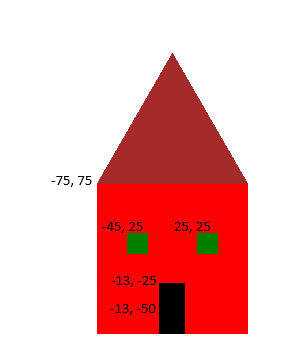
Here is code for the first four shapes in the house.
from turtle import *

def filled_polygon(size, sides, color):
    pendown()
    pencolor(color)
    fillcolor(color)
    begin_fill()
    for i in range(sides):
        forward(size)
        right(360 / sides)
    end_fill()
    penup()

speed(0)
hideturtle() # Make the turtle invisible so that the picture looks better.
penup()

goto(-75, 75)
filled_polygon(150, 4, "red") # Main part of house
left(60) # Point the triangles up
filled_polygon(150, 3, "brown") # Roof

right(60) # turn back straight
goto(-13, -25)
filled_polygon(25, 4, "black") # Top of door
goto(-13, -50)
filled_polygon(25, 4, "black") # Bottom of door
You are welcome to start with the house code I gave you, but I expect you to add windows and other features like clouds and a sun or some trees.
Due at the end of class on Monday, April 20.
Continue work on your Turtle Picture Project. Use the planning techniques described above to create a recognizable picture using turtle graphics functions. You can use the house example as a starting point, or you can design your own picture from scratch.
Requirements:
lastname_turtle_pic.py.
Your project is due at the end of class on Monday, April 20.