Turtle Picture Project
Use coordinates to place shapes and build real pictures.
A useful function in the turtle module is goto().
This moves the turtle to a position specified by x, y coordinates given as
parameters. The coordinates are in pixels, measured from the center of the window.
The window is around 800x800 pixels, which means coordinates in the range
of about -400 to 400 should fit. You can always resize the window with
your mouse.
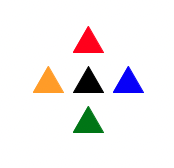
The following code draws five filled triangles, and the output is
shown below it. Notice the new function definition for filled_polygon(), which
is like the polygon() function you wrote last week, but it adds a third parameter
for the color. In the body of the function, it uses new turtle functions begin_fill() and end_fill()
to create a filled shape, and it uses pencolor() and fillcolor() to set the colors. The rest of the
code uses goto() to place the triangles in the right positions.
from turtle import *

def filled_polygon(size, sides, color):
    pendown()
    pencolor(color)
    fillcolor(color)
    begin_fill()
    for i in range(sides):
        forward(size)
        right(360 / sides)
    end_fill()
    penup()

speed(0)
hideturtle() # Make the turtle invisible so that the picture looks better.

left(60) # Point the triangles up
filled_polygon(30, 3, "black") # A triangle in the center

goto(0, 40)
filled_polygon(30, 3, "red") # A triangle above the center

goto(0, -40)
filled_polygon(30, 3, "green") # A triangle below the center

goto(40, 0)
filled_polygon(30, 3, "blue") # A triangle to the right of the center

goto(-40, 0)
filled_polygon(30, 3, "orange") # A triangle to the left of the center
Due at the end of class on Monday, April 20.
In the fall, you had an assignment to draw a house using the VEX virtual
robot. In this assignment, you can draw a house, a car, a face, or
anything else, as long as it is recognizable as something real. An
abstract design is not allowed. Put a simple comment (hashtag) at the top
of your code saying what the
picture is, such as # House.
Try using functions such as polygon() and filled_polygon() to draw shapes,
and use goto() to place them in the right positions.
To remind yourself of turtle graphics commands, use this handout: Turtle Commands.
Save your program as lastname_turtle_pic.py and
upload it to your OneDrive folder. It is due at the end of class on
Monday, April 20.